Thread Branches
Fork any message in a conversation into its own focused sub-thread, then share a summary back to the main chat.
Overview
A thread branch is a separate conversation that lives alongside the main thread but is focused on a single topic. You open a branch from any existing message when you want to explore an idea in depth without cluttering the main conversation. The branch has its own message history, its own AI context, and — when you are done — you can share an AI-generated summary back into the main thread so everyone can see what was concluded.
This is especially useful in team settings, where one person may want to dig into a technical detail or do a quick research session while the rest of the conversation continues in the main thread.
How It Works
-
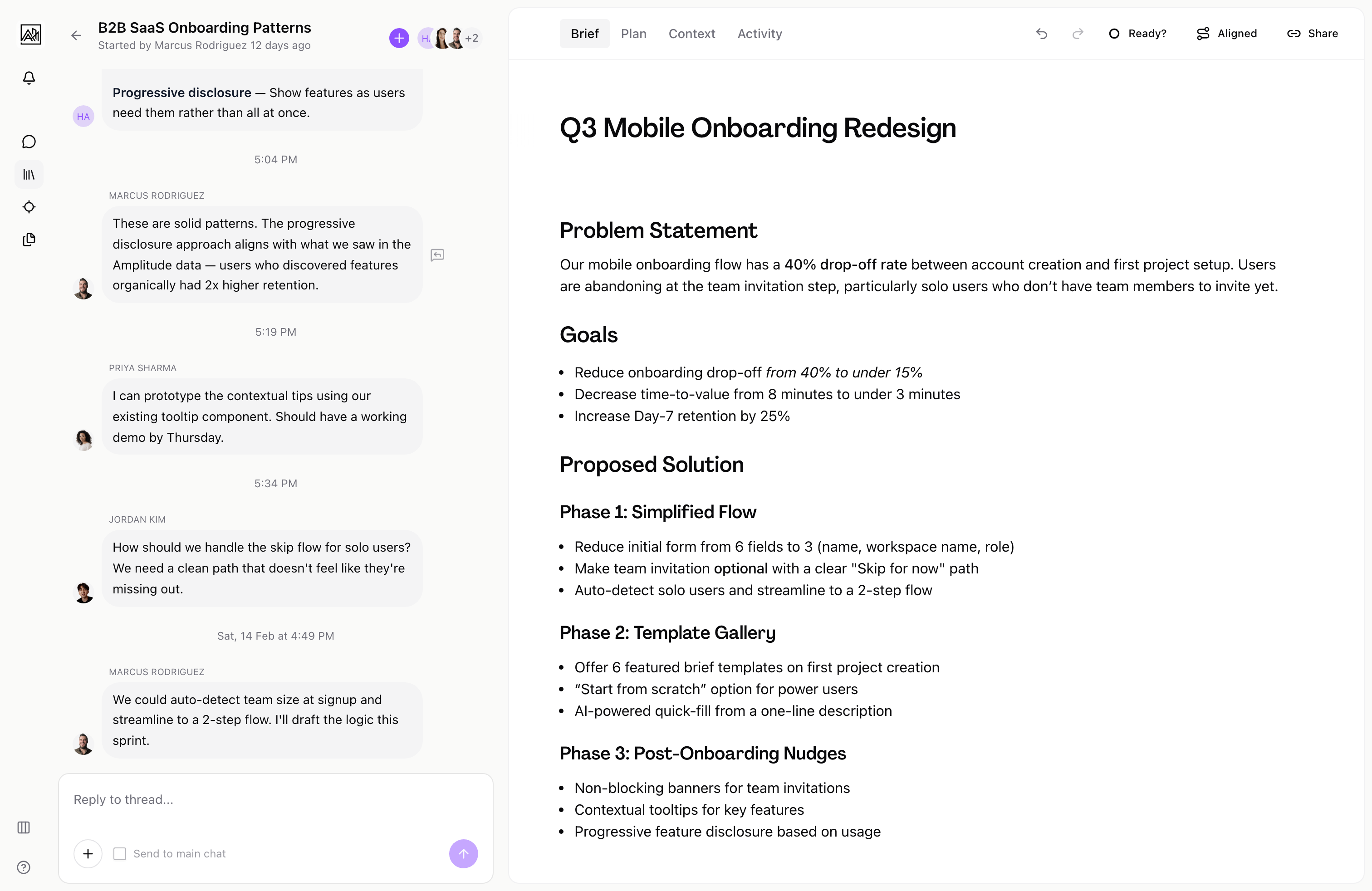
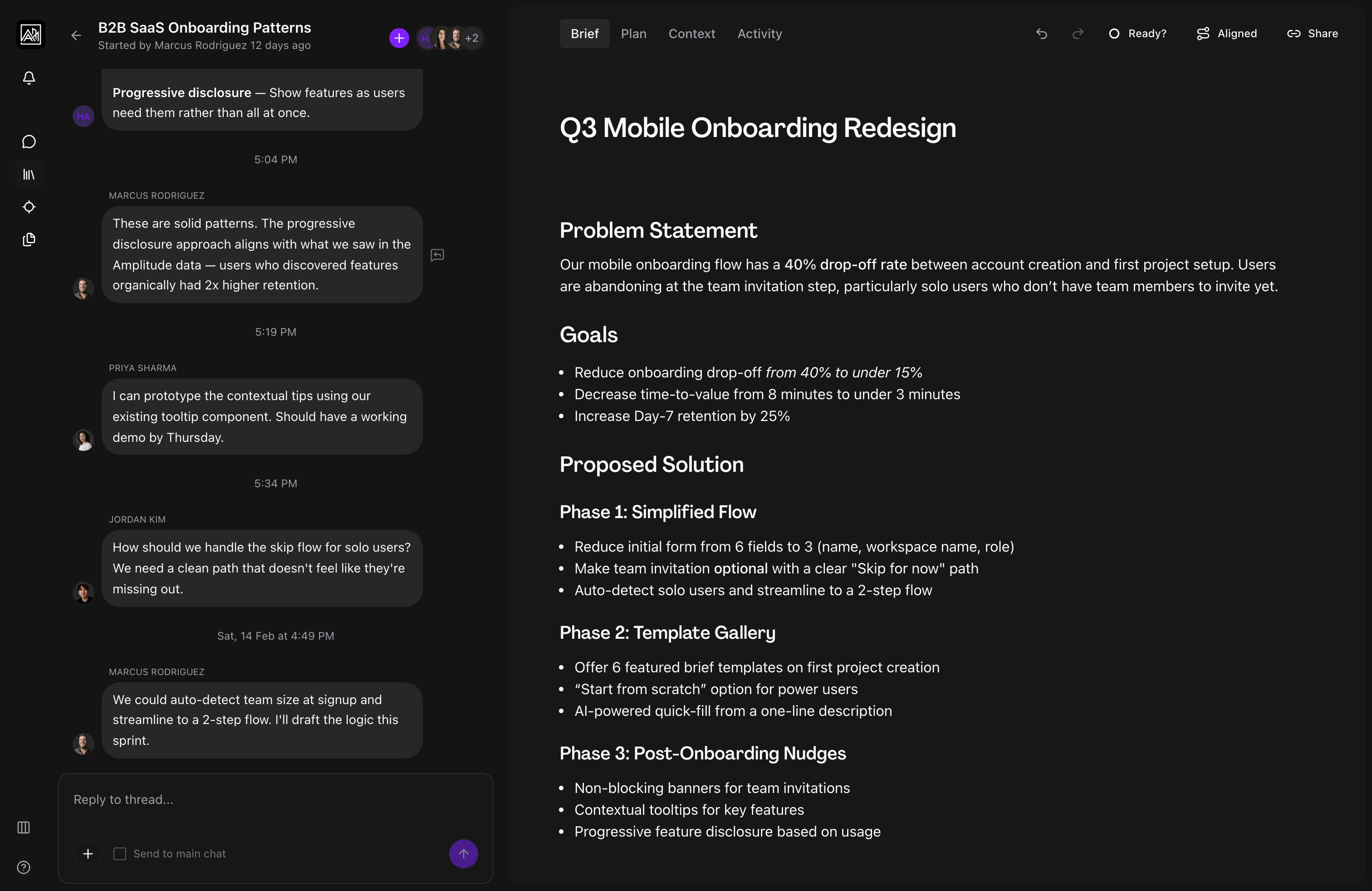
Open a branch — Hover over any AI or user message in the thread and click the reply icon. This creates a new child thread anchored to that message and slides the branch view in from the right, overlaying the main conversation.
-
Converse in the branch — The branch behaves exactly like a normal thread. You can type messages, receive AI responses, attach files, and continue the conversation for as long as needed. The branch header shows the title, who started it, and when.
-
Return to the main thread — Click the back arrow in the branch header to close the branch and return to the main conversation. Your branch is saved and can be reopened later from the same message.
-
Share a summary — When a branch conversation reaches a natural conclusion, the AI generates a summary automatically. A prompt appears at the bottom of the branch asking whether to share this summary back to the main thread. Click "Share summary" to post a compact summary card in the main conversation. You can dismiss this prompt if you prefer not to share.
-
View the summary in the main thread — The shared summary appears as a message card in the main thread, attributed to the person who shared it and linked to the branch. Any participant in the main thread can click "View full summary in thread" to reopen the branch and read the full conversation.
Key Capabilities
-
Anchored branches: Each branch is linked to the specific message that spawned it. The parent message in the main thread displays a visual indicator showing that a branch exists. Clicking that indicator reopens the branch.
-
AI-generated summaries: When a branch has enough content, the AI produces a written summary automatically. Summaries are versioned — if you continue the branch conversation after sharing a summary, a new summary is generated and you are prompted to share it again.
-
Summary sharing: The share prompt only appears when there is new summary content that has not yet been shared. If you dismiss it, the prompt will reappear the next time a newer summary version is ready.
-
Branch participants: Branches have their own participant list. You can invite teammates directly into a branch from the branch header, giving them access to that sub-conversation without adding them to the entire main thread.
-
Child thread messaging: When you are inside a branch, the input shows an option to also send your message to the parent thread. This lets you escalate a finding back to the main conversation without manually copying it.
-
Deep linking: Branches are addressable by URL. If you share a link to a branch, the recipient lands directly on that sub-thread overlaid on the parent conversation.
Tips
- Use branches when you want to run a focused research session, explore an alternative approach, or work through a detailed problem without fragmenting the main conversation history.
- Share the summary to the main thread before closing a branch. This keeps all participants aligned without requiring them to read every message in the branch.
- If a teammate has already shared a summary from a branch, you can still open the branch to read the full conversation. The summary is a shortcut, not a replacement.
Related
- Thread Messaging — Sending messages and replies in the main thread
- AI Responses — How the AI works within branches
- Activity Timeline — Tracking conversation and branch activity on a brief